I had a terrible time installing Adobe CS5.5 on OS X Lion 10.7.2; it was the kind that makes you string together colorful phrases and aim them at Adobe. In theory one should be able to install on top of a prior installation. Then again, in theory communism works.
In short, the installer ran, accepted the serial number, authenticated my adobe id account, and offered me a number of packages to install, however when the grand moment came to install the applications, the progress bar never turned into a progress meter. The estimated completion time remained at “Calculating.” And the percentage complete remained at 0%. The only way out was Force Quit.
I should point out if you’re seeing authentication errors, and not a hang error, make sure you have the Java Runtime installed on Lion. Java doesn’t come with Lion by default (thanks for that, Apple). It’s a known issue to Adobe, and it’s discussed on the Apple forums.
Skip to solution…
More Symptoms — Is this familiar?
A failed install can manifest with
some of the product installed, just not the application. For instance PDApp, AAM Updated Notified, LogTransport2, Setup, AAM Register Notifier, adobe_licutil, all will appear in the dash board.
The Adobe Setup Error.log will have nothing in it beyond the text “Performing Bootstrapping…”
::START TIMER:: [Total Timer]

CHECK: Single instance running

CHECK : Credentials

Load Deployment File

Create Required Folders

Assuming install mode

::START TIMER:: [Bootstrap]

Perform Bootstrapping …
If one opens Console and looks at the System Log Queries / All Messages, you might see this:
1/25/12 8:05:39.637 PM PDApp: CFURLCreateWithString was passed this invalid URL string: ‘/System/Library/Frameworks/’ (a file system
path instead of an URL string). The URL created will not work with most file URL functions. CFURLCreateWithFileSystemPath or CFURLC
reateWithFileSystemPathRelativeToBase should be used instead.

1/25/12 8:05:39.637 PM [0x0-0x25025].com.adobe.PDApp.setup: 2012-01-25 20:05:39.636 PDApp[389:60b] CFURLCreateWithString was passed
this invalid URL string: ‘/System/Library/Frameworks/’ (a file system path instead of an URL string). The URL created will not work
with most file URL functions. CFURLCreateWithFileSystemPath or CFURLCreateWithFileSystemPathRelativeToBase should be used instead.
Looking at the .log files in /Library/Logs/Adobe/Installed, you might see an Error DW020 or Error DW050. In reading In reading http://kb2.adobe.com/cps/902/cpsid_90243.html, I see that it says if there are no additional errors types (there weren’t)
 to see http://kb2.adobe.com/cps/844/cpsid_84451.html, which didn’t help either.
HOWEVER, at the end of the article it makes this observation: “These errors occur when the version of Flash Player that on your syst
em is newer than the version installed by the CS5.5 installer.”
Someone thread on http://forums.adobe.com/thread/856962 suggested the problem is Adobe AIR, which I noted was installed the m
oment I installed the Adobe Support Advisor to decipher Adobe log files, expose error messages, and make recommendations of support articles. Of course, it wasn’t.
Sometimes cleaning a bit appears to help, only to falsely get your hopes up. The installer may appear to run and then issue this:
Exit Code: 24

————————————– Summary ————————————–

– 0 fatal error(s), 65 error(s), 0 warning(s)

ERROR: DW001: Set payload cancelled status
ERROR: DW049: Payload {007A2A28-D6A8-4D91-9A2B-568FF8052215} has an action “install” but no resultState

… repeats dozens of times with different GUIDs …

ERROR: DW049: Payload {FECCB1BF-038D-41C2-861B-4560E7667005} has an action “install” but no resultState

ERROR: DW050: The following payload errors were found during install:

ERROR: DW050: – Adobe Player for Embedding 3.1: User cancelled installation

ERROR: DW001: User cancelled the operation

—————————————- ———————————————
For the record, I did not cancel the operation.
Checked http://kb2.adobe.com/cps/834/cpsid_83481.html, but Exit Code 24 wasn’t listed.
In looking at http://blogs.adobe.com/oobe/2010/04/cs5_desktop_product_subscripti.html, there is a comment by By Isaac O. Nwuju – 9:5
7 PM on February 1, 2011 that writes Error Code 24 in a response to Adobe thinking an Adobe product is already installed.
Other Mostly Useless References
I have read
http://kb2.adobe.com/cps/905/cpsid_90508.html.
- I am able to get to my ~/Library folder with no problems, that’s not the issue.
- I do have the Java runtime installed:
$ java -version

java version “1.6.0_29”

Java(TM) SE Runtime Environment (build 1.6.0_29-b11-402-11M3527)

Java HotSpot(TM) 64-Bit Server VM (build 20.4-b02-402, mixed mode)
- I am not seeing Crash Reporter delays
- I am not having issue with opposite scroll behavior
- I have no need to use Rosetta
- My issue is one of installation, not product features, so autosave/restore/versioning/fullscreen/multi-touch are all non-issues.
- As I can’t get any software installed, I don’t have a product specific issue.
I have read http://www.adobe.com/products/creativesuite/faq.html#lion-os and have downloaded and installed the latest Flash Player.

I have read http://kb2.adobe.com/cps/828/cpsid_82827.html and it was not helpful.
- I am able to make it all the way past the Install Options screen.
- The progress bar never computes an estimated time or disk space, and installation remains at 0%.
- The installer does not report any conflicts, the cleaner tool does not report any other Adobe products, and the Support Advisor tool does not report any problems with the environment.
- The hard disk has over 150GB of free space.
- The OS meets the minimum requirements.
- The Install _did_ initialize.
- No other installer is running.
- The file system is not case-sensitive, but is case-preserving.
- I do have administrative rights.
I have read http://kb2.adobe.com/cps/844/cpsid_84451.html which was partially helpful…
Looking at PDApp.log, I see this error message:
Mon Jan 23 18:25:33 2012[WARN] LWANative – Error in mdbOpenSessionNoCreate 8
And also this later on:
Mon Jan 23 18:25:34 2012[INFO] LWANative – pwa_openSession Session key : 24A46193-DEC1-47E4-AE35-41B39D994CF7

Mon Jan 23 18:25:34 2012[ERROR] LWANative – OOBElib returned error: 34

1/23/2012 18:25:34.889 [INFO] DWA.Utils PWA closesession returned <result><session^gt;24A46193-DEC1-47E4-AE35-41B39D99 4CF7</session></r

esult>
Trial mode, as suggested by Adobe Tech Support, results in this:
1/23/2012 18:25:34.898 [INFO] DWA.StartWorkflow Appmanager size is 98285568 bytes after conversion

Mon Jan 23 18:25:34 2012[INFO] LWANative – pwa_openSession Session key : 655B1D34-154C-43DE-A070-52C639724FAE

Mon Jan 23 18:25:34 2012[ERROR] LWANative – OOBElib returned error: 47

1/23/2012 18:25:34.922 [WARN] DWA.Fetchserialnumber Fetch serial numbers returned nothing

1/23/2012 18:25:34.927 [INFO] DWA.Utils PWA closesession returned <result><session^gt;655B1D34-154C-43DE-A070-52C63972 4FAE></session></result>

Mon Jan 23 18:25:34 2012[ERROR] DWANative – Error in dwa_getInstalledPathOfPayload, pdbSession is NULL.
I can not find those error messages in the Installation launch log error table provided by Adobe at http://kb2.adobe.com/cps/834/cpsid_83481.html.
Based on any error from oobelib it appears the issue is the same – the serial number is not getting validated. This happens regardle
ss if I enter one or use trial mode. This may be because of the prior error that wasn’t able to create a session, which most likely
holds said serial number. That said, the installer does put a green check mark by the serial number when I type it in [correctly].
The article http://kb2.adobe.com/cps/828/cpsid_82828.html is useless, as I’m using the serial number off the box and the installer says it’s correct, taking me to the next screen.
The other error message appears in http://forums.adobe.com/message/4139645 — which suggests repairing disk permissions. I have, though no permission problems were found.
To summarize, I feel I’ve exhausted the online knowledge base looking for a solution.
Adobe Support
I ended up calling Adobe Support at 1-800-833-6687 and learned a few things.
They will try to spend no more than 10 minutes with you on the phone, opting to give you a time intensive task and call you back to check on things.
The initial call was frustrating and almost discouraged me from talking to them again. It boiled down to walking me through the novice steps, and then getting me to download the .dmg off their website in an attempt to blame the media.
When that didn’t work, coupled with sending them some log files and the level of detail above, I got someone who was willing to drag a supervisor into the call. I was told that because I had documented in my case file the details so well, that they were to be extra careful as there was a techie on the line. (This made me wonder if they watch out for “secret shoppers” who test technical support.)
When things really got bad, things escalated to level two support was conferenced in, which is apparently the last line of defense — but at that point I had developed the solution I’m sharing below.
Here’s how I solved it.
First, and I can not stress this enough, back up your machine. And by that, I don’t mean Time Machine only, but a bit-for-bit copy on an external drive using Carbon Copy Cloner or SuperDuper!. Or, clone the drive with Drive Genius. I strongly recommend running Disk Utility after booting an OS X Lion disc and doing a Repair Disk and a Repair Disk Permission before you start. No sense in backing up a corrupted volume.
Second, validate that your backup worked by booting from it using the Option key. Because if your bork things up, you’re going to need to restore from it, and better to learn about that now, not later. If you’re gonna skip this step, at least go read the humorous Tao of Backup before proceeding.
Finally, what I’m about to share worked for me on my installation; your result may vary, and I’m not responsible if it doesn’t work, you mess it up, nor will I be offering support. Hopefully, with the timid gone the geeks remain.
If you’ve got Adobe already installed
Make a copy of your plug0in directory. You find it by opening /Applications, find an app like Adobe Photoshop, and inside the folder that contains it, you’ll see something called Plug-ins. Copy this to somewhere safe.
If you can use Help / Deactivate… so that you don’t burn up a silver bullet and have to call Adobe Support, whose number is 1-800-833-6687, by the way.
You should be able to uninstall the Creative Suite by going to “/Applications/Utilities/Adobe Installers”, and finding an uninstaller.
Uninstalling with the big guns
You’ll want to obtain a copy of the
Adobe Create Suite Cleaner Tool. Run it, and clear out CS3, CS4, and CS5-CS5.5.
Going nuclear on Adobe
Create a file called
wipeAdobe.sh, put the following in it, and give it execute permissions with
chmod u+x wipeAdobe.sh.
open /Applications/Utilities/Adobe\ AIR\ Uninstaller.app
sudo "/Volumes/Adobe Creative Suite Cleaner Tool/Adobe Creative Suite Cleaner Tool.app/Contents/MacOS/Adobe Creative Suite Cleaner Tool" --removeAll=CS3

sudo "/Volumes/Adobe Creative Suite Cleaner Tool/Adobe Creative Suite Cleaner Tool.app/Contents/MacOS/Adobe Creative Suite Cleaner Tool" --removeAll=CS4

sudo "/Volumes/Adobe Creative Suite Cleaner Tool/Adobe Creative Suite Cleaner Tool.app/Contents/MacOS/Adobe Creative Suite Cleaner Tool" --removeAll=CS5-CS5.5 --removeFP=1
cat ~/Adobe*.log
rm -rf ~/Adobe*.log
rm -rf ~/Library/Application\ Support/Adobe

sudo rm -rf ~/Library/Caches/Adobe

sudo rm -rf ~/Library/Caches/AdobeSupportAdvisor.*

sudo rm -rf ~/Library/Caches/com.adobe.air*

sudo rm -rf ~/Library/Caches/com.Adobe.Installers*

rm -rf ~/Library/Preferences/AdobeSupportAdvisor*

rm -rf ~/Library/Preferences/Macromedia/Flash\ Player

rm -rf ~/Library/Preferences/com.adobe*

sudo rm -rf ~/Library/Saved\ Application\ State/AdobeSupportAdvisor*

sudo rm -rf ~/Library/Saved\ Application\ State/com.adobe.*

sudo rm -rf ~/Library/Saved\ Application\ State/com.Adobe.*

rm -rf ~/Library/LaunchAgents/com.adobe*

sudo rm -rf ~/Applications/Adobe*

sudo rm -rf /Users/wls/Library/Application\ Support/CrashReporter/Adobe*

sudo rm -rf /private/var/db/receipts/com.adobe.*

sudo rm -rf /Applications/Adobe*

sudo rm -rf /Applications/Utilities/Adobe*

sudo rm -rf /Library/LaunchAgents/com.adobe*

sudo rm -rf /Library/Application Support/Adobe

sudo rm -rf /Library/Application Support/regid.1986-12.com.adobe

sudo rm -rf /Library/Frameworks/Adobe AIR.framework

sudo rm -rf /Library/Logs/Adobe

sudo rm -rf /Library/Logs/DiagnosticReports/Adobe*

sudo rm -rf /private/var/root/Library/Saved\ Application\ State/com.Adobe.Installers.AdobeCreativeSuiteCleanerTool.savedState

sudo rm -rf /private/var/root/Library/Caches/com.Adobe*
echo "Searching...."

sudo find /Library ~/Libary /private -print | grep -i adobe
rm -rf /tmp/asu*
ls /tmp
echo "Please reboot and consider reinstalling a fresh copy of Adobe Flash and Adobe AIR"
Now run it from Terminal: $ ./wipeAdobe.sh
The prep before the install
Seriously, reboot after doing the above nuclear clean.
Then, download the latest copy of Adobe Flash and install it.
Download the latest copy of Adobe AIR and install it.
And, just in case you need to analyze the log files, snag a copy of the Adobe Support Advisor, which will help you analyze the logs that appear at ~/Library/Logs/Adobe and /Library/Logs/Adobe.
Boot in Safe Mode
Finally, reboot the system,
holding down Shift to boot into
Safe Mode.
Login with an account that has Administrator rights. Note you do not need to make a new account, though it’s a last resort.
Because safe mode is not loading kernel extensions and clearing caches, you’ll going to find the system running rather slow. This is normal. Lauchpad is going to look abysmal.
Install the software
Now using your Disks, or a downloaded copy of the Adobe Creative Suite 5.5 Master Collection, install the software.
Enter the serial number, provide your Adobe ID, select your products, and press Next.
After everything installed, open an application like Photoshop, go to Help / Updates…
Quit the application.
Restoring the Plug-ins
Open up the application Plug-in directory as well as your saved Plug-in Copy. Copy over anything that’s not in the application’s Plug-in, making sure they end up in the same folders. Check them all. Do not over write any files or directories.
Restart the software and validate the plug-ins work. If they do, restart and log back in.
You’re done. Had you used Pixelmator or The Gimp, you’d have been photo editing rather than following this blog.

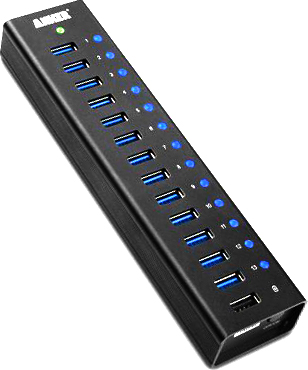 I finally found one that’s rock solid; it’s the Anker 13-Port USB 3.0 and it does everything I ever wanted.